
Not inspected does not mean everything was fine.
You arrive for a flat handover, but boxes hide a corner and one cupboard is locked. A blank line in the inventory does not explain either problem. A useful account identifies the area you could see, the part you could not check and the question that remains. This guide focuses on practical record keeping for renters in England.
How can you do this in DepKeeper? See the app example ↓
Define the part that was inaccessible
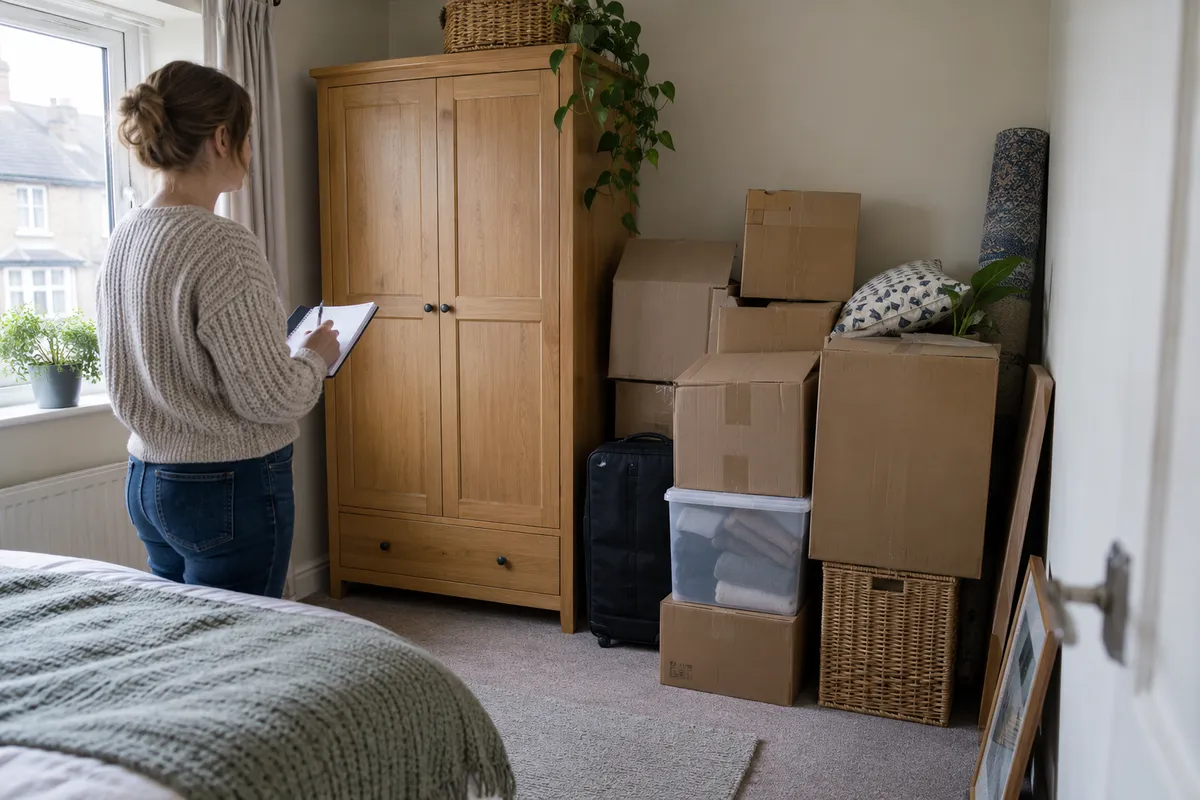
Describe the boundary rather than rejecting the whole room. “Floor behind the wardrobe not visible” is more precise than “bedroom not checked” if you inspected the rest. Separate lack of access from poor lighting and from an appliance you did not test: each needs a different next step.
Take an overview from a position you can safely reach. It can explain why the area was obscured, but it does not show the hidden surface. Do not label that photograph as evidence that the covered area was undamaged. Avoid including another person’s letters, documents or private belongings in the frame.
Ask about access before moving anything
Ask the person handling the handover whether the space is included and how it can be inspected. A locked owner’s cupboard and a tenant’s included storage area are different situations. Record the answer as an explanation you received, keeping it separate from what you personally saw.
Do not force a lock, climb on furniture or shift heavy objects to complete a photograph. If someone offers to move an item, agree a safe practical arrangement rather than taking it on yourself. If access cannot be arranged at the visit, note the remaining question and the contact responsible for answering it.
Use a pending list alongside the inventory
For each open point, keep four pieces of information together: the location, the reason inspection was limited, the photo reference and the requested follow-up. This can be a plain list; it does not need a complex scoring system. Avoid replacing a precise limitation with a green tick or a general “good condition” label.
Shelter England advises checking that an inventory is accurate and keeping a copy. Its guidance also recommends photographs of marks and retaining repair correspondence. The pending list here is an editorial method for explaining scope, not a substitute for the inventory or a rule about who must pay for damage.
Write a specific request
This fictional example asks for clarification without guessing what lies behind the obstruction. Adapt the location and access arrangement to the actual flat. Keep the message with the version of the inventory you reviewed, so a later reader can understand what was known at that point.
Keep the later visit distinct
When the area becomes accessible, record the actual date of the new observation. Photograph an overview and any relevant detail. Refer back to the pending entry instead of presenting the second visit as part of the original inspection. Keep the original files and the correspondence that arranged access.
If you find a mark, describe its position and appearance. You may know when you first saw it without knowing when it appeared. That distinction matters: an access note explains a gap in your inspection, but cannot establish who caused something during that gap. Ask for an inaccurate description to be clarified rather than silently rewriting an agreed document.
Close an open point only when the record explains it
A response saying “we will look later” is still an arrangement, not a completed inspection. After the follow-up, check that the observation, date and any outstanding question can be found together. If a disagreement remains, retain both positions instead of turning one person’s statement into an agreed conclusion.
At move-out, use the combined history as a reference and take fresh photographs. An old image of boxes is not a photograph of the exposed floor. If a deposit dispute arises, use guidance for the tenancy and location rather than assuming that a pending note guarantees a particular result.
Before you finish: a short checklist
Read the open-point list as if you had never visited the flat. Can you identify the exact place, understand the limit and find the next action? Clear wording is more useful than adding many nearly identical photos.
- Exact room and part of the room named.
- Observed and hidden areas kept separate.
- Reason for limited access stated.
- No private documents visible in shared images.
- Access request and response retained.
- Later photographs use their actual date.
- Unresolved disagreement remains visible.
Keep your observations together in DepKeeper
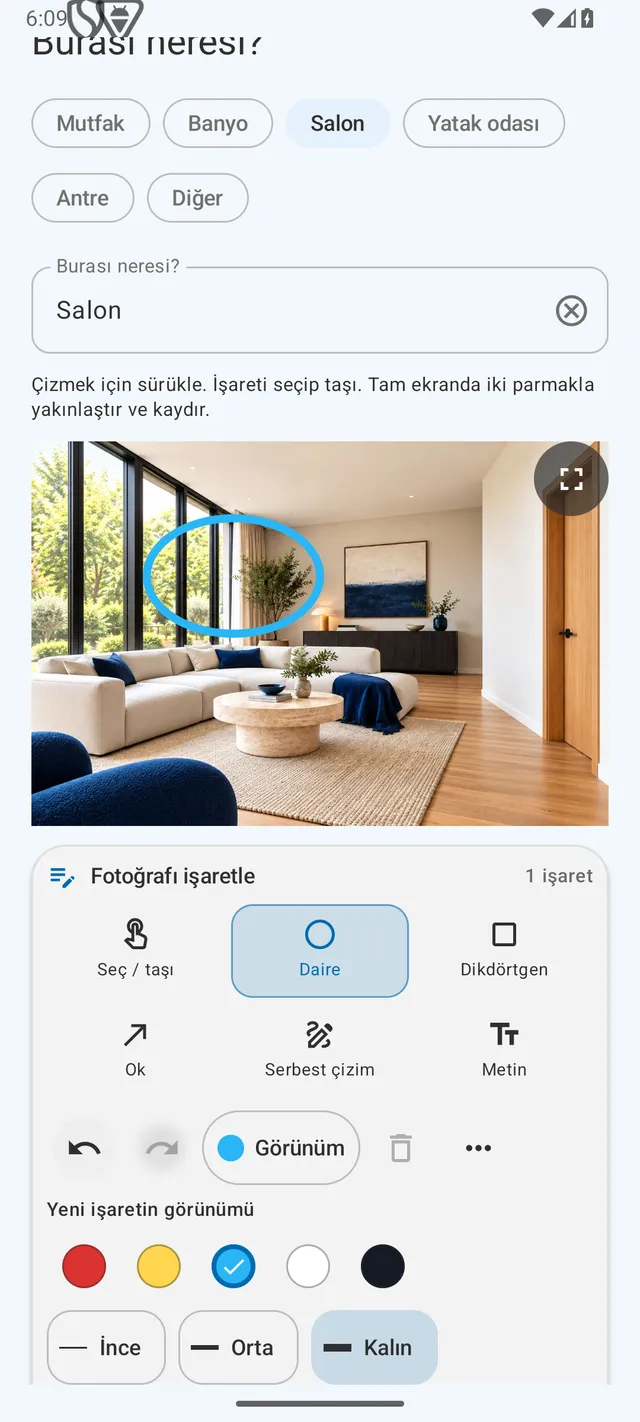
In DepKeeper’s rental-home flow, use the room name and photo description to explain the inspected area. Add the overview and manually mark the relevant visible point if helpful. A follow-up should be described as a later observation; the app cannot see through furniture or establish the history of a concealed mark.
The Android store launch is still being prepared. The preview below is a real, version-labelled example screen. For now, use the free checklist and join the launch waitlist if you would like an availability email.
PUT IT INTO PRACTICE WITH DEPKEEPER
Make it clear which detail you mean.
Use DepKeeper’s annotation tools to connect an observation to the relevant part of a photo. Keep the overview too, so the detail retains its context.
- Add the room and a short observation.
- Choose a circle, rectangle, arrow, freehand line or text.
- Check the annotation and description before creating your report.
The Android app is being prepared for store release.
Prepare the parts you can check.
Use the free checklist and request an Android launch notification.
Sources
Checked 5 October 2026. Shelter guidance applies to England; the pending-list workflow is our practical editorial suggestion. No outcome or legal responsibility is guaranteed. Example invented for illustration.