
Follow the same order at every handover.
A useful handover report still makes sense months later: which property, which handover and which detail it describes. Start with a consistent inspection order.

How can you do this in DepKeeper? See the app example ↓
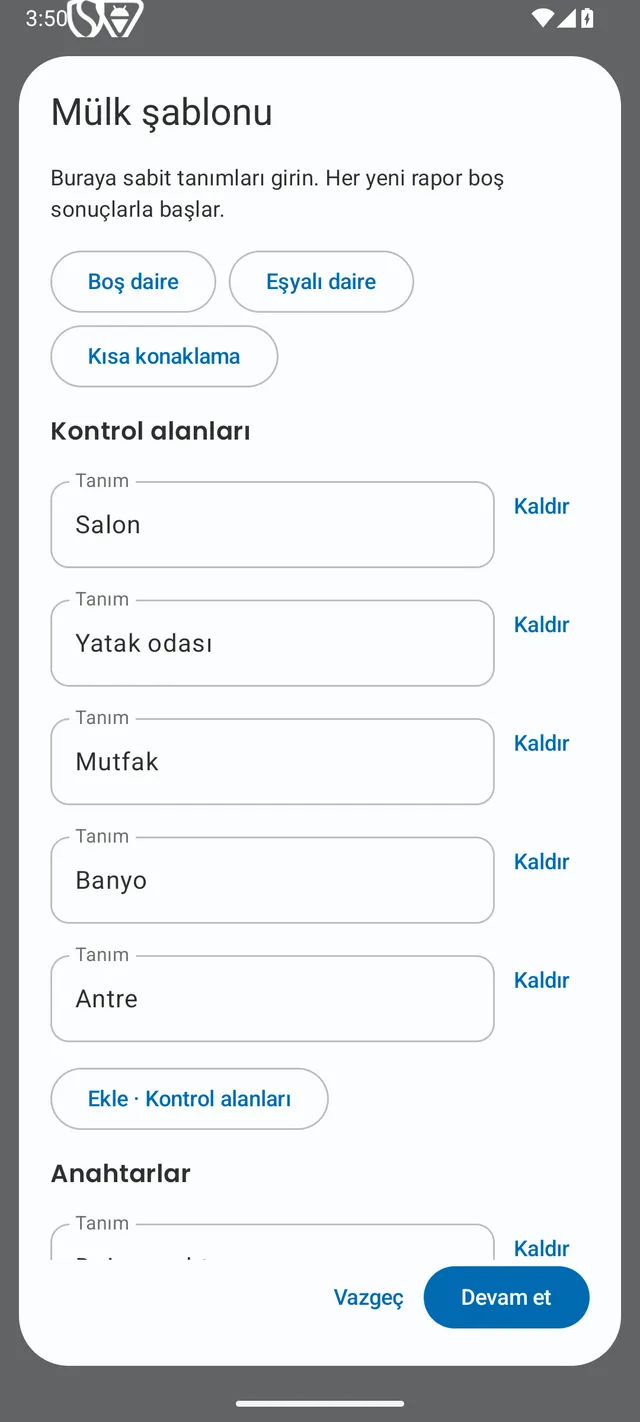
Reuse the property template, renew the observations.
Prepare the room names and inspection areas for a property once: entrance, living room, kitchen, bathroom and any balcony. An unfurnished apartment and a furnished holiday home may need different items. Adapt the template to the property.
Dates, parties and observations must be new for each handover. A previous tenant’s photos, meter readings or signature are not the result of a new inspection. Give arrival and departure reports distinct names.
Photograph each room, then its details.
Walk through rooms in a consistent order. Take a wider view first, then a closer photo of anything that needs explanation. A close-up of a scratch is hard to interpret if nobody can tell which wall it belongs to.
Use a description such as “living room, thin line on the wall to the right of the window”. Describe the location and visible condition without guessing who caused it. Mark inaccessible areas as unchecked.
Include furnishings, remotes and kitchen items where relevant. A device appearing in a photo does not mean you tested it; record the actual check separately.
Write down keys and readings as well as photographing them.
Count keys, access cards and remotes by type. Make it clear what was received or returned. Keep address and access details out of public posts.
For accessible meters, add the identity, visible reading, unit and observation date. Retake an unreadable photo or state that you could not read it. At departure, check a fresh value rather than copying the old one.
Review the PDF before signatures and sharing.
Check the property, date, preparer and party details. Confirm that photos belong to the right rooms and that keys and readings describe this handover. Use business names and logos only when authorised.
If using an on-screen signature, review that report version together first. DepKeeper requires new signatures after report content changes. This is not an identity verification or qualified electronic signature service.
Share the report with your chosen recipient and retain the PDF and original photos you need. Deleting the app’s report does not recall shared copies. If attaching your own contract PDF to a combined report, keep the original separately: the combined copy does not preserve its original digital signature or interactive fields.
PUT IT INTO PRACTICE WITH DEPKEEPER
A consistent property template, fresh observations each time.
In DepKeeper Agent Mode, prepare the property’s inspection areas as a template and enter fresh results for every handover.
- Start with an unfurnished, furnished or short-stay template.
- Adjust the rooms and inspection areas for the property.
- Review new photos, keys and meter details when preparing the handover report.
The Android app is being prepared for store release.
Use the workflow in Agent Mode.
The Android preview includes property templates, keys and meters, a business-branded PDF and optional on-screen signatures. Store publication is being prepared. A report documents observations; it does not guarantee a deposit refund, a dispute outcome or a fixed time saving.